
Agency and Supplier Asset Handoffs

An exhibition concept may establish a clear aisle focal point while leaving the asset behind that focal point surprisingly fragile. The image is present, but the receiving supplier cannot identify its intended surface, approved crop, editable source, or current review stage.
An agency-supplier handoff should connect each visible intention to an inspectable record. The receiving role needs to know what visitors should recognize, which asset creates that cue, what files support it, and who owns the next unresolved decision.
A folder of graphics answers only part of this task. The handoff must preserve context, dependencies, source status, and decision ownership without presenting a concept preview as evidence of production approval.
Start With the Visitor View
Review the concept from the position where the graphic must perform. This might be the main aisle, zone threshold, demo edge, or approach to a meeting area.
- Identify what is recognized first.
- Name the logo, image, message, or product cue acting as the focal point.
- Note any surface or message competing with that cue.
- Locate the supporting information and when it becomes visible.
- Record what changes as the visitor moves closer or changes direction.
This sequence is the visitor-view intent. It should travel with the asset rather than remain implicit in a presentation deck or agency conversation.
For example, a non-approved concept preview might depict a product image dominating the aisle view, with a campaign line appearing at the threshold. The handoff should map those cues to separate asset IDs, surfaces, crops, and review records. Sending two image files without that mapping allows a later placement change to reverse the intended hierarchy.
Use observable language. Replace “premium” with the visible decisions: restrained copy, a large product crop, strong image-to-background contrast, and a logo positioned above the aisle sightline. Replace “immersive” with the surfaces involved, their intended field of view, and the position from which they align.
The checkpoint is direct: can the supplier inspect the same visitor-view intention that the agency and exhibitor reviewed?
Asset Handoff Checklist
An asset handoff checklist works best at asset level. Each record should represent one controlled asset or a clearly defined family of variants.
| Handoff field | What to record | What the receiver can inspect |
|---|---|---|
| Identity and version | Asset ID, filename, revision, and dated version label | Whether the file matches the manifest and whether another version conflicts |
| Review stage | Reference, concept preview, editable source, supplied output, proof, or role-approved output | What the file has actually been used to decide |
| Placement | Zone, surface, panel, orientation, and relevant template reference | Where the asset is expected to appear |
| Visitor position | Aisle, threshold, demo edge, or meeting approach | Which view the asset is intended to influence |
| Visual role | Focal, supporting, directional, or background | Its place in the brand hierarchy |
| Crop and variant | Crop ID, orientation, language, and content variation | Whether the selected treatment matches the reviewed preview |
| Source and dependencies | Authoring file, application version, linked graphics, placed files, and fonts | Whether the receiving workflow has the required components |
| Dimensions and template | Document and surface dimensions, template revision, and issue date | Which production context was used and what remains provisional |
| Color and proof | Named reference, swatch information, supplied sample, and proof stage | Which color reference is being carried forward and what has been reviewed |
| Source status | Creator, source, credit, usage record location, restrictions, and relevant dates | What documentation exists without treating the record as a rights determination |
| Decision ownership | One responsible role and one precise open question | Who must provide the next answer |
Mark material fields as confirmed, assumed, pending, or unknown. A blank can mean irrelevant, overlooked, unavailable, or awaiting confirmation.
Unknowns are legitimate handoff data. They should remain visible.
Keep Version and Review Stage Separate
A version identifies the iteration being transferred. A review stage records what has happened to that iteration. Labels such as “final,” “latest,” or “approved-new” blur both facts.
A useful record might distinguish an agency working version, an exhibitor comment version, a revised source, a supplier technical-review version, and a proof returned for review. The same version may pass through several reviews, while one comment may create a new version without changing its source status or intended placement.
Record the reviewer’s role, decision scope, and date. Acceptance of campaign wording does not establish acceptance of the crop, dimensions, color output, usage permission, or venue requirements.
Connect Each Asset to Its Surface
A filename such as hero-image-final says little about where the image belongs. Connect the file to a surface through an annotated board, graphic elevation, or current supplier template.
- Record the surface or panel identifier.
- State the intended orientation and dimensions.
- Mark obstructions, interruptions, crop limits, and focal areas.
- Use bleed and safe-zone instructions from the appointed supplier’s current documentation.
- Identify adjacent messages, logos, or display content.
- Record the visitor position used during review.
- Name the template revision and issue date.
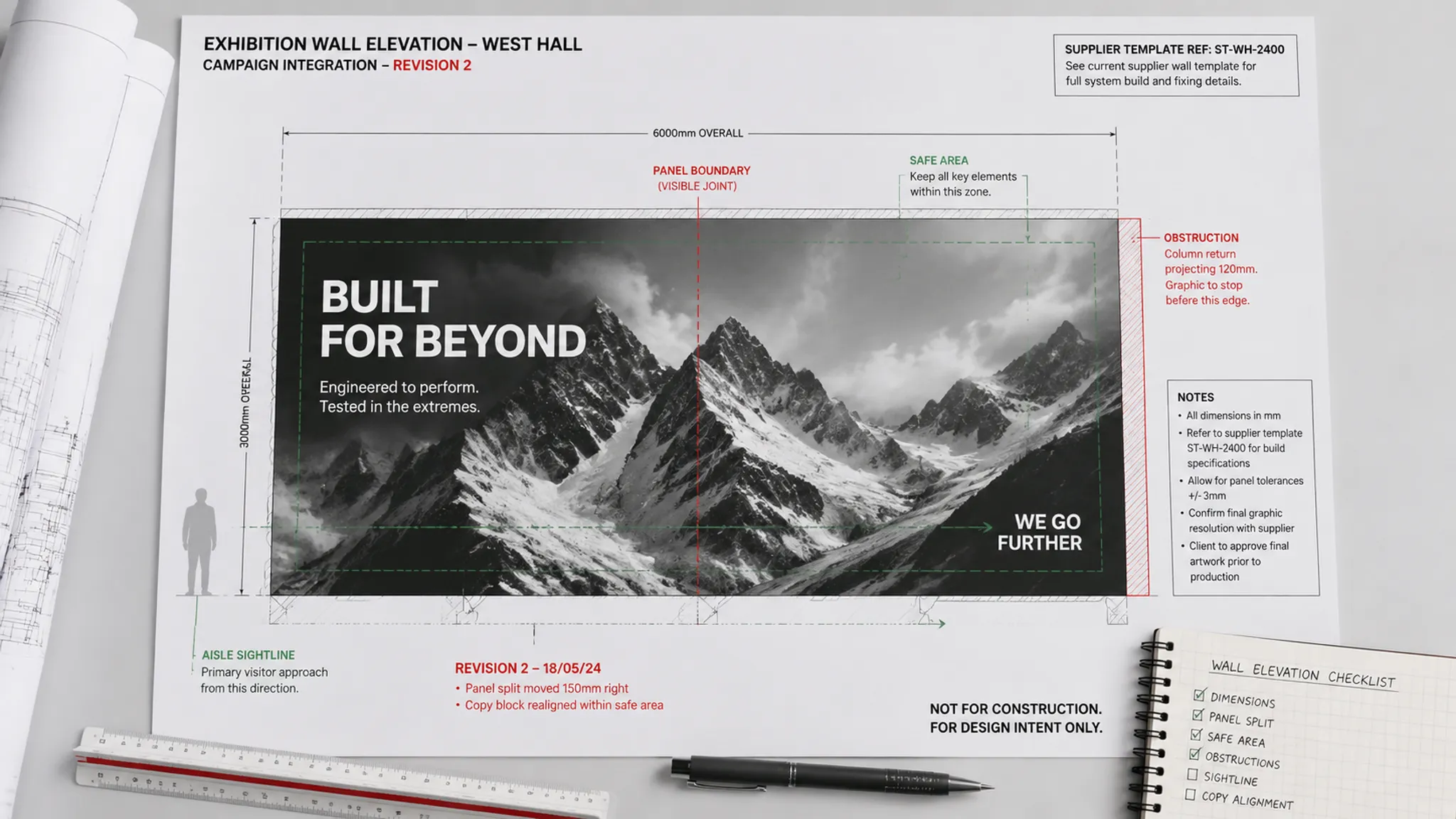
Dimensions, bleed, effective resolution, and output settings depend on the supplier’s process, material, scale, finishing method, and current template. A generic production figure cannot replace project documentation.
A sharp screen image also does not establish suitability for enlargement. The supplier needs the source dimensions, placed scale, intended output process, and current specification to assess that use.
When the template is provisional, label the placement accordingly. The crop can still support visual comparison, while its production dimensions remain unknown.
Check Source Files and Dependencies
Editable file requirements depend on the receiver’s task. A review PDF may support a comment round, while an artwork revision may require the authoring file and its dependencies.
Adobe documents packaging functions in InDesign and Illustrator that gather working documents and certain linked resources. Ohio University’s print-submission guidance similarly identifies layout files, linked images, graphics, fonts, and third-party material as separate package components.
Use those mechanisms as a transfer check:
- Identify missing or modified links in the working document.
- Compare placed assets with the handoff manifest.
- Confirm that the packaged document carries the recorded version.
- Check nested and externally referenced files.
- List required fonts and route transfer or substitution questions.
- Include the preview used during visual review.
- Retain the package report when the software creates one.
- Record the authoring application and relevant version.
Packaging gathers files. It does not confirm the selected crop, output suitability, font-transfer terms, source status, or permission for the intended use.
Preflight is another distinct state. It may expose document and dependency issues, but it is not proof review, supplier acceptance, or project approval.
Inspect the Package Against the Manifest
The receiving role should compare the package with the manifest before revising artwork. A single “package complete” indicator cannot answer every handoff question.
- Identity: Do the document, links, and preview carry the expected identifiers?
- Completeness: Are required graphics and editable elements present?
- Consistency: Does the working document reproduce the supplied preview?
- Placement: Is each asset mapped to the intended zone, surface, and crop?
- Substitution: Has a font, image, color reference, or language variant changed?
- Status: Are concept, supplied, reviewed, and role-approved materials separated?
- Ownership: Does each unresolved issue have one next decision owner?

A package can open without errors and still communicate the wrong hierarchy. Compare its output from the documented aisle or threshold view, not only at close working distance.
Track Source Records Without Treating Them as Permission
The IPTC Photo Metadata Standard provides fields for information including creator, source, credit, copyright notice, rights usage terms, instructions, and description. These records can improve traceability as an image moves between roles.
Capture the available information in the manifest even when it is embedded in the image:
- Creator or supplying organization
- Original source and credit instruction
- Copyright notice where supplied
- Stated usage terms and usage context
- Location of any license, release, or permission record
- Relevant territory, duration, expiry, or restriction
- Role responsible for resolving the remaining status
Embedded metadata should not be the only project record because export and delivery processes may omit fields. Keep the source status in the manifest and identify the controlled record location.
Metadata, a credit line, repository access, or a public-domain label does not itself settle project-specific usage. United States Copyright Office guidance also describes fair use as contextual rather than a fixed formula. Questions about another jurisdiction or a particular use should be routed to the rights holder or a qualified adviser using current material.
Separate Reviews That Answer Different Questions
Several roles may inspect the same asset for different reasons. Combining their work under one “approved” column conceals what remains unresolved.
| Review | Primary question | What remains outside its scope |
|---|---|---|
| Visitor-view review | Is the intended cue recognizable from the stated position? | Output suitability and production acceptance |
| Brand review | Has the designated owner accepted the message, image, logo, and hierarchy? | Rights status and supplier requirements |
| Source review | Are creator, source, usage, and permission records available? | A rights determination |
| Dependency inspection | Can the working file locate its required assets and fonts? | Correct placement and proof acceptance |
| Supplier technical review | Does the asset follow the supplier’s current process and template requirements? | Organizer or venue acceptance |
| Proof review | Does the proof reflect the expected content, crop, and stated color reference? | Structural, accessibility, and safety determinations |
| Organizer review | Has the organizer completed the review required within its stated scope? | Decisions beyond that scope |
Use separate fields for reviews that apply. Mark an excluded review as not applicable rather than silently treating it as complete.
Assign Each Decision to the Right Owner
A visible question without an owner will travel as an assumption. “Please confirm” is too vague when several roles could respond.
- Agency: creative intent, composition, crop, campaign hierarchy, and source correction
- Exhibitor or brand owner: message, logo use, campaign content, and internal acceptance
- Appointed supplier: current template, dimensions, output process, artwork requirements, and proof workflow
- Organizer or venue: requirements within its documented review process
- Rights holder or qualified adviser: unresolved permission and usage questions
- Production role: controlled output preparation after required inputs and decisions are available
Assign one next owner to each open question. Other roles may contribute, but one routed decision prevents parallel assumptions.
Write the question so its scope is inspectable. Replace “check image” with “Can the supplied raster source support the confirmed panel size under the appointed supplier’s current specification?” Replace “rights pending” with “Who will confirm whether the recorded terms cover this graphic, territory, and display period?”
Worked Handoff Example
Consider an invented example involving a large product image on an aisle-facing wall. The non-approved preview depicts the product first, the logo second, and a demo message near the threshold.
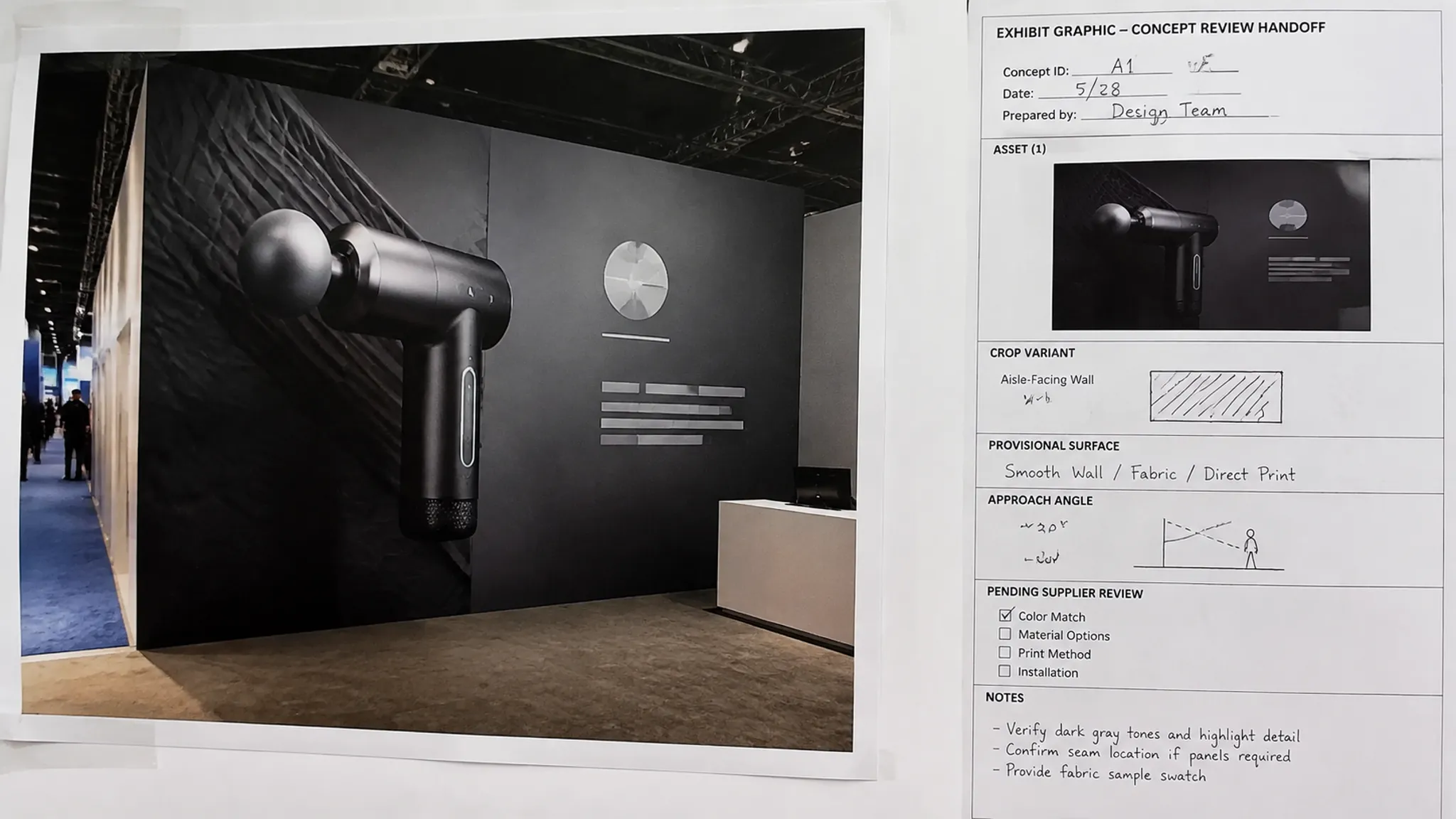
The record identifies asset IMG-014, crop C3, the aisle-facing surface, and the main aisle review position. It also lists an agency working file, a separate preview, and a linked high-resolution source whose output suitability remains pending.
The surface size is provisional until the supplier issues its current template. Creator and source information are recorded, usage confirmation belongs to the brand owner, and proof review has not started. Supplier technical review is the next stage.
The record preserves the intended focal cue without overstating certainty. When a revised template arrives, the crop can be compared using the same campaign goal, surface, approach angle, and identified version.
Common Handoff Misreadings
“The PDF is the handoff”
A PDF may preserve the reviewed appearance but omit editable text, original image data, links, or required fonts. Identify whether it is a preview, supplied output, proof, or role-approved deliverable.
“The files were packaged, so they are ready”
Packaging supports transfer completeness. It does not resolve crop choice, source status, supplier requirements, output suitability, or approval.
“The image has metadata, so usage is resolved”
Metadata records information about an asset. It does not create permission or determine whether the stated terms cover the project.
“The preview is sharp, so the large graphic will work”
Screen appearance does not establish performance at the intended dimensions. Route the source file, placed scale, surface details, and current template to the supplier.
“Final means everyone accepted it”
Final has limited value unless the record identifies the version, deliverable, reviewer, decision scope, and date. Named review stages carry more information.
Handoff Completion Threshold
An asset can move to the next role when that receiver can identify what to inspect, reproduce the relevant review context, and see every unresolved question.
- The intended visitor cue is tied to an exact asset, surface, crop, and variant.
- The manifest, files, and preview agree on identity, version, and review stage.
- Editable sources and dependencies are included when the receiving task requires them.
- Supplier dimensions and template information are confirmed or marked unknown.
- Color reference and proof status are recorded separately.
- Source and usage records are traceable without being presented as a rights conclusion.
- Every open question has one next decision owner.
The strongest handoff is not the folder containing the most files. It is the package that lets the receiver inspect the intended visitor effect, trace its supporting assets, and distinguish confirmed decisions from assumptions and unknowns.
Name the unresolved handoff, then send that question to the role able to decide it.