
Selected View and Asset Registers
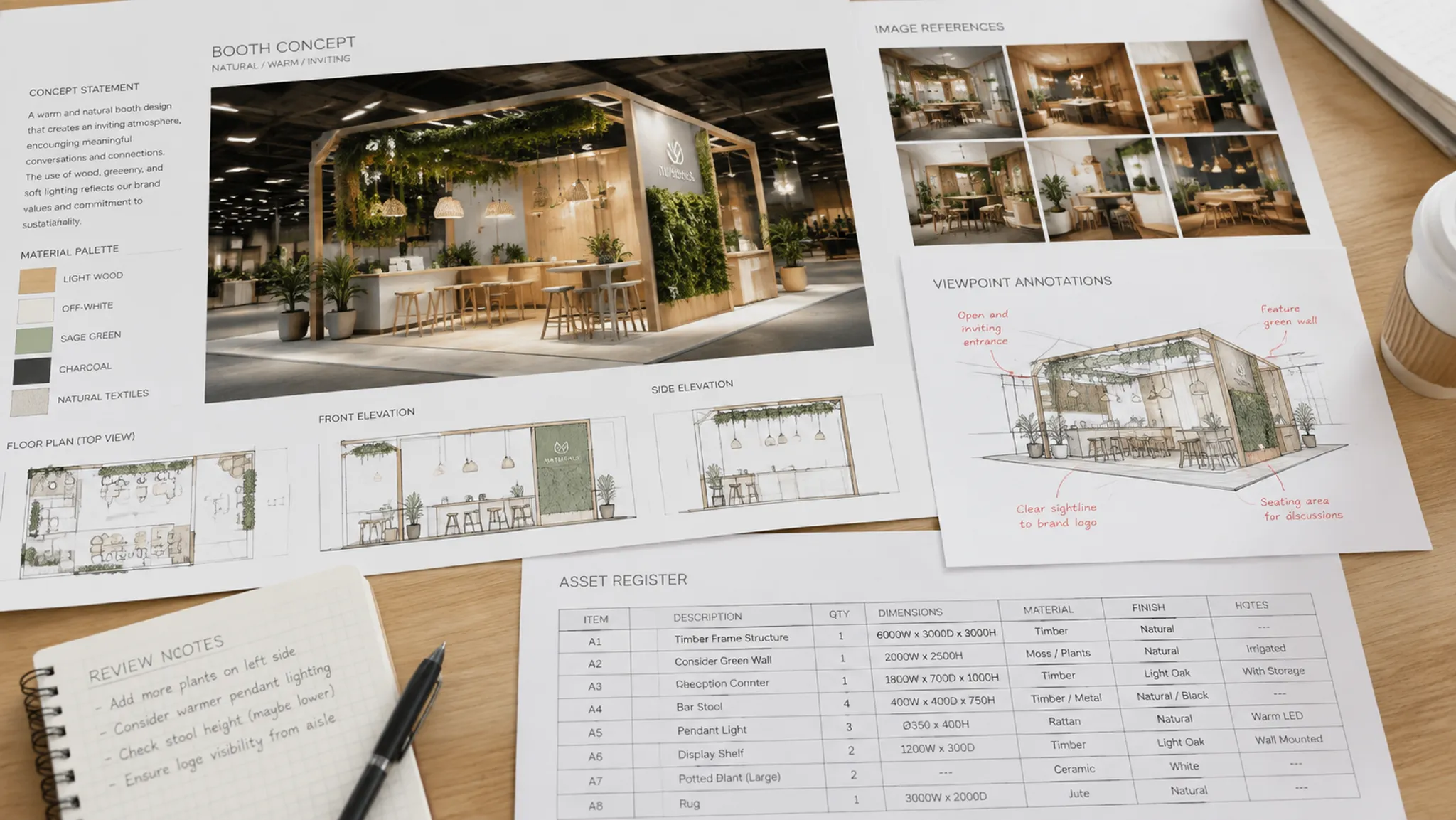
A selected design asset register helps an exhibition team judge one visual direction from several visitor viewpoints. It connects each asset's visible role, the approach angle where that role matters, the available source record, and the next unresolved project decision.
That connection matters when a concept preview looks convincing but leaves important questions open. An image may establish a focal point from the front aisle while its creator, permitted use, final artwork requirements, or review stage remains unknown.
The register is a visual review and handoff tool. It does not determine rights, venue suitability, accessibility, engineering, safety, or approval status.
What a Selected Design Asset Register Records
A selected design asset register is a focused record of the visual assets chosen for an exhibition concept. It may include campaign imagery, product photographs, diagrams, illustrations, logos, video stills, texture references, meeting-zone graphics, demo content, and concept-preview elements.
The useful question is not only which files are included. Ask what each asset is expected to do, where that role should be judged, what evidence supports it, and which decision remains open.
| Register field | Review question |
|---|---|
| Asset ID | Can the team refer to this asset consistently? |
| Visible description | What appears in the file, and what format is represented? |
| Visible role | Is it a brand focal point, product cue, wayfinding element, demo prompt, meeting-zone signal, or supporting graphic? |
| Visitor viewpoint | Should the asset be judged from the aisle, threshold, demo edge, meeting approach, or another stated position? |
| Intended hierarchy | Should it be noticed first, second, or only after a visitor pauses? |
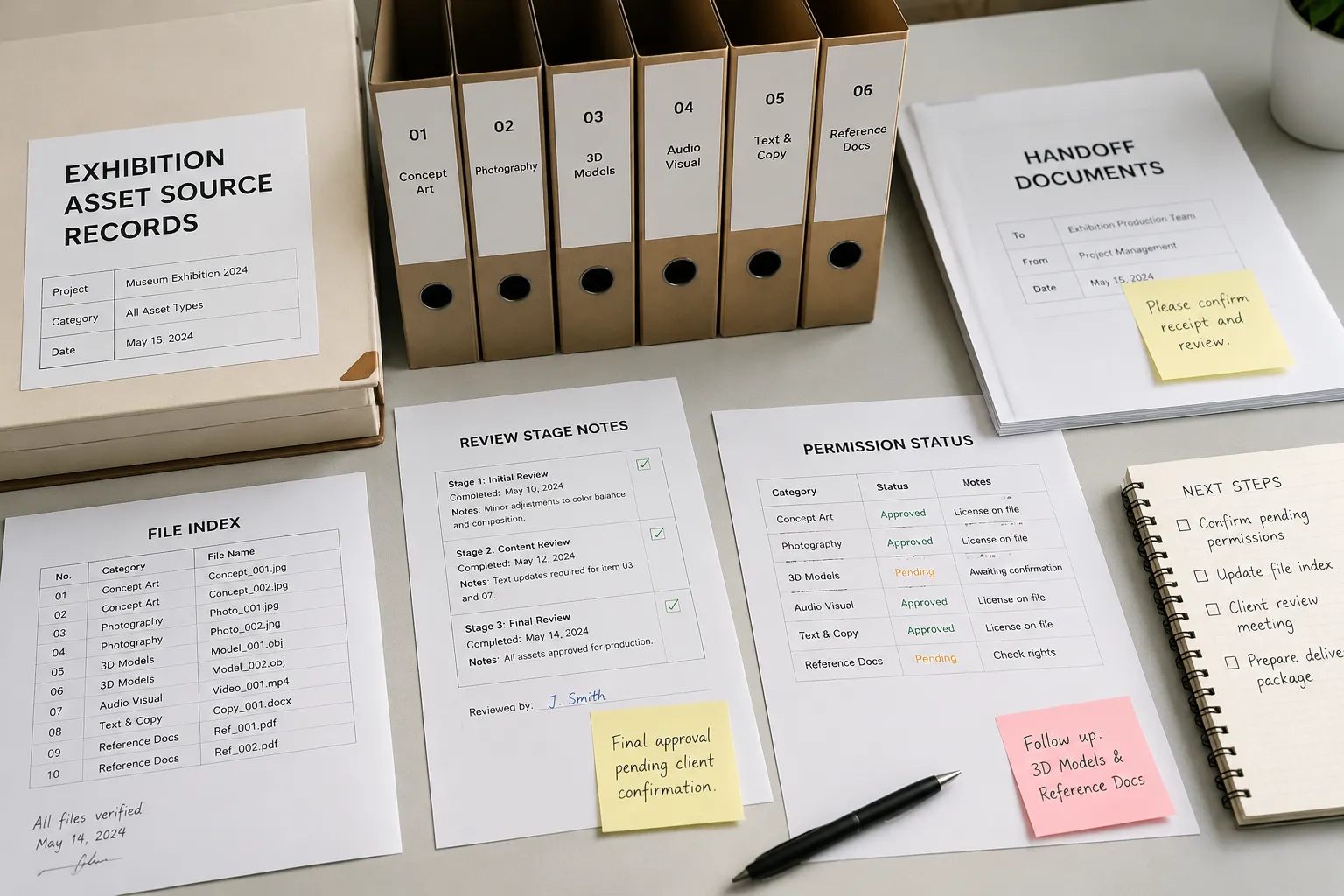
| Source status | Is there a source file, creator record, supplier reference, or unknown origin? |
| Permission question | Are attribution, adaptation, territory, duration, or usage details recorded? |
| Review stage | Is the item a reference, concept preview, selected direction, developed specification, or approval record? |
| Handoff owner | Does the next question belong to the designer, client, rights holder, supplier, organizer, or production team? |
| Open decision | What must be confirmed before the asset moves to the next stage? |
These fields reflect broader documentation and asset-management practices, adapted for exhibition review. The available material does not establish one universal commercial exhibition standard, so the record should match the project brief and current review stage.
Read the Asset From the Visitor View
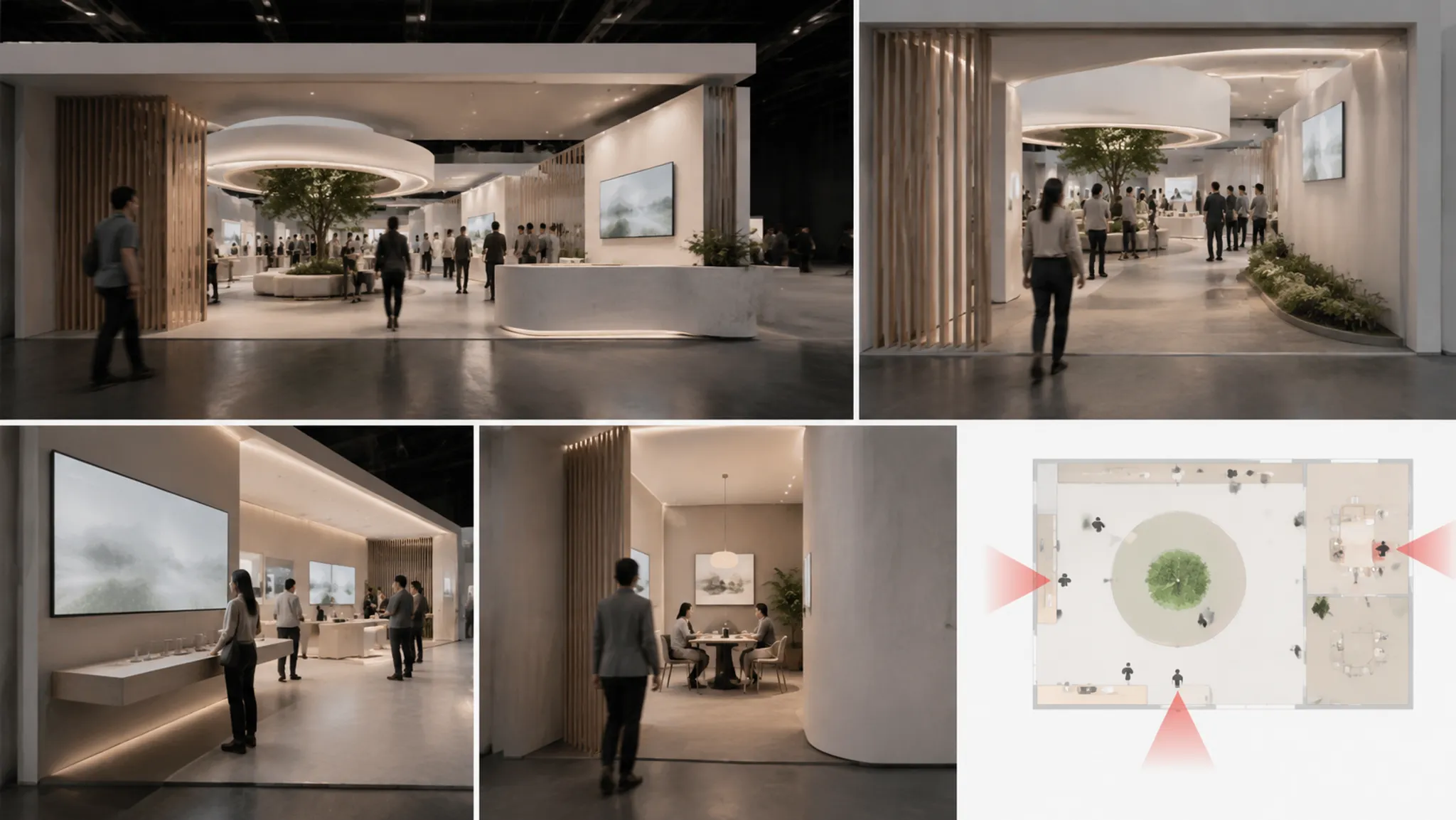
The same asset can appear effective from one approach angle and unresolved from another. A high-level graphic may establish brand hierarchy from the main aisle, then become difficult to interpret near a demo-zone threshold.
Name the visitor position before judging the asset.
From the main aisle
The aisle view tests first recognition within the shown composition. Record which element becomes the focal point and whether the brand mark, campaign image, product, or architectural feature dominates.
- Which asset attracts attention first?
- Does supporting text appear legible in the supplied view?
- Which important elements disappear outside the central sightline?
- Does the image indicate an intended route or leave the approach open?
The image shows one composition from one viewpoint. It does not establish visibility from every approach direction.
At the zone threshold
The threshold between the aisle and a demo or meeting area changes the question. The team is checking whether the selected asset signals the zone's purpose and supports the expected next action.
- Is there a visible cue at the point of entry?
- Does the focal point sit near the relevant threshold?
- Does the campaign message relate to the activity inside the zone?
- Do competing graphics weaken the intended hierarchy?
- Are placement, dimensions, or content requirements still unknown?
A concept preview can indicate intended emphasis. It cannot confirm final physical placement or visitor movement conditions.
At the demo edge
Review the demo edge as a working viewpoint rather than a distant presentation image. Ask what a visitor can recognize before, during, and after the demonstration.
An asset may be intended to explain a product, signal an active demonstration, support a presenter, provide a reference during conversation, or remain secondary to a physical object or screen. If the hierarchy is unclear, route the visual question to the designer. If the concept depends on a developed display or artwork specification, route that question to the supplier or production team.
At the meeting approach
Meeting-zone assets operate at a closer viewing distance. Their role may involve orientation, campaign continuity, privacy cues, or a recognizable brand reference.
- Is the asset intended to be read before entry?
- Does it support the meeting zone without competing with conversation?
- Does it continue the hierarchy established from the aisle?
- Does its role depend on undocumented content or dimensions?
- Does it require a separate source or permission record?
The preview does not establish acoustics, accessibility, structural suitability, or final privacy conditions. Those questions belong with the relevant qualified project role.
Separate Visible Role From Intended Meaning
A common register error is to describe an asset only by its subject. “Product image” identifies what appears in the file, but not what the team expects it to communicate in the exhibition concept.
Use two descriptions:
- Visible description: what the image, graphic, video still, or reference visibly contains.
- Project role: what the team expects that asset to do in the selected direction.
| Visible description | Project role |
|---|---|
| Close image of a product surface | Draw attention to a material or feature |
| Wide campaign photograph | Establish the main brand focal point |
| Diagram beside a screen | Clarify a demo sequence |
| Repeated logo pattern | Maintain brand continuity across a boundary |
| Illustrated process graphic | Support explanation during a meeting |
| Short video reference | Suggest motion or content direction |
The visible description is an observation. The project role is an intention or interpretation. Keeping both fields prevents an assumed purpose from being mistaken for something the image itself proves.
Compare Assets Under Matched Conditions
A source-based comparison is useful only when the alternatives are judged under the same conditions. Do not compare one asset from a front-facing hero view with another from a close meeting view and call the result a hierarchy decision.
Keep the following conditions consistent:
- Visitor viewpoint and approach angle.
- Campaign objective and zone requirement.
- Approximate review stage.
- Intended viewing distance.
- Other major focal points shown in the concept.
Suppose two campaign images are proposed for the main aisle wall. Option A presents a single product with strong contrast. From the aisle, the product is immediately identifiable, but the wider campaign context is limited.
Option B shows people using the product in a broader scene. The context is clearer, yet the focal point may be less specific from a distance.
Neither image is universally better on this evidence. The register should state which visitor viewpoint and project role each option serves, then identify the decision owner.
From the main aisle, Option A presents a sharper product focal point. Option B provides more context but requires confirmation that the brand cue remains visible at the same approach angle. The design lead should confirm the intended hierarchy before later source and production decisions advance.
That entry keeps observation, interpretation, and the next decision separate.
Track Source Status Without Making a Rights Determination
Source status describes the evidence available about an asset. It does not determine whether the asset may be used in a particular project.
A source record may identify:
- The creator or originating organization.
- The supplied file name, version, and date received.
- The publication or campaign from which the asset came.
- The person or team that supplied it.
- A license, permission record, or usage note.
- Restrictions involving adaptation, territory, duration, attribution, or distribution.
- Unknown fields that still require confirmation.
The source record confirms what has been documented. It does not automatically confirm the complete permitted-use context. Useful labels describe the current record without implying a legal conclusion:
- Source identified, permission question open.
- Internal source record attached.
- Rights-holder confirmation requested.
- License details incomplete.
- Supplier reference only.
- Creator unknown.
- Reference image, replacement required.
- Concept placeholder.
An asset should not be treated as cleared merely because it appears in a presentation, mood board, or earlier campaign. Project-specific permission questions should go to the rights holder, publisher, photographer, source owner, or appointed adviser.
Keep Review Stages Distinct
A convincing image can compress several project stages into one visual. The register should separate the impression created by the image from the record that supports a later decision.
Concept preview
A concept preview communicates an intended visual direction. It may show relative emphasis, approximate placement, a proposed image, or a possible relationship between brand, product, and zone.
It does not establish complete dimensions, material specifications, technical files, permissions, venue requirements, accessibility conditions, safety suitability, or approval status.
Selected direction
A selected direction records that the team is considering a preferred visual option. A chosen campaign image, layout approach, or focal-point arrangement can still have unresolved source and permission questions.
Developed specification
A developed specification contains more project information than a concept image. Depending on the brief, it may include dimensions, production notes, artwork requirements, materials, finishes, content files, revision details, or supplier instructions.
The appointed team and project scope determine the required detail. It should not be inferred from an image alone.
Approval record
An approval record documents a decision made by the relevant project authority. It should be distinguishable from an informal comment, presentation preference, or assumption that no one objected.
Record the approval reference and date when supplied. Do not convert an unrecorded assumption into approval.
Route Each Open Question to the Next Handoff
The register becomes practical when every unresolved field leads to a named project role.
| Open question | Likely route |
|---|---|
| Does the asset support the intended focal point? | Exhibition designer or visual review lead |
| Is the image source documented? | Client, campaign owner, or asset manager |
| What project-specific usage question remains? | Rights holder, publisher, photographer, source owner, or appointed adviser |
| Does the graphic require another file or scale? | Designer, artwork team, or supplier |
| Does the asset depend on venue requirements? | Organizer, venue documentation, or appointed project lead |
| Are dimensions or installation details absent? | Designer, supplier, or production team |
| Has the selected direction been formally accepted? | Client or project approval record |
| Does a visual cue raise a technical or access question? | Qualified accessibility, safety, engineering, or production adviser |
A review lead can write, “The preview shows a suspended graphic in the intended focal position.” The same reviewer should not infer its suitability for a venue or project installation.
Use the Register as a Review Trail
An asset register review tool does not need to be a complex platform. A structured sheet or project record can be sufficient when it preserves the connection between asset, viewpoint, source status, review stage, and unresolved decision.
- Name the viewpoint. Use the main aisle, corner approach, zone threshold, demo edge, or meeting approach.
- Describe the visible cue. Record what attracts attention, what recedes, and what appears unclear.
- State the intended role. Link the asset to brand hierarchy, product recognition, orientation, demo explanation, or meeting-zone identity.
- Record source status. Mark missing permission or attribution details as open rather than filling the gap with an assumption.
- Label the review stage. Distinguish a reference, concept preview, selected direction, developed specification, and approval record.
- Route the next question. Assign the unresolved issue to the role that can answer it and name the required record where known.
The result is a review trail, not a collection of unsupported verdicts.
Common Mix-Ups
A visual reference is treated as the final asset
A mood-board image may communicate colour, subject, or atmosphere while still needing replacement, permission confirmation, artwork preparation, or client review. Record its role and status separately.
A source record is treated as permission
A file name, photographer credit, or campaign folder can help identify an asset. It does not by itself establish the full permitted-use context. Keep source evidence and the open permission question in separate fields.
A concept preview is treated as a developed specification
A render can show relative position and intended emphasis. It does not reveal every dimension, construction detail, utility dependency, or production instruction. Route those questions to the relevant project team.
A clear front view is treated as every visitor view
The main image may prioritize the intended focal point without showing corner approaches, oblique sightlines, threshold conditions, or close-range reading. Add the viewpoint to each entry.
A team preference is treated as approval
A selected option may be the current preference without being formally accepted. Keep selection, revision, and approval records distinct.
Worked Example: One Asset, Four Records
Consider an invented exhibition scenario in which a concept preview shows a large campaign photograph beside a product demonstration. This is an example, not a documented project.
Visible role
From the main aisle, the photograph occupies the dominant wall area. The product is visible beside it but receives less visual emphasis.
Visitor viewpoint
At the demo edge, the product becomes more prominent because the visitor is closer to the demonstration. The campaign image remains a supporting cue.
Source status
The register identifies the photograph as supplied by the campaign team. The original creator, permitted exhibition use, and adaptation conditions are not recorded.
Handoff questions
- Should the campaign photograph remain the primary aisle focal point?
- Does the demo-zone hierarchy require a stronger product cue?
- Which record identifies the source and addresses the intended use?
- Does the supplier need final artwork rather than the preview image?
- Has the selected arrangement reached a documented approval stage?
The register has connected visible role, viewpoint, source status, and handoff. It has not claimed that the image is approved or suitable for the next project stage.
What the Available Evidence Supports
The available research is useful for separating project requirements, designer intention, visitor-facing observation, and later evaluation. It also offers examples of consistent asset identification and traceable documentation workflows.
Its coverage is indirect for commercial exhibition design. It does not define one required design asset register or verify project-specific rights, venue requirements, accessibility, safety, engineering, specifications, or approvals.
For those matters, consult the applicable project records:
- Organizer or venue documentation.
- Rights-holder or source records.
- Project briefs and artwork instructions.
- Revision logs.
- Supplier specifications.
- Qualified technical guidance.
- Documented approval records.
When a required record is absent, write “unknown” or “confirmation required.” A missing field is a project condition, not permission to infer the answer.
Practical Handoff Record
A useful handoff entry can fit into a small number of fields:
- Asset
- Campaign image A
- Viewpoint
- Main aisle, left-corner approach
- Visible role
- Primary campaign focal point
- Observed cue
- High-contrast image occupies the largest graphic area
- Interpretation
- Intended to establish campaign recognition before the demo zone
- Source status
- Supplied by campaign team; creator and usage record unknown
- Review stage
- Concept preview
- Open decision
- Confirm hierarchy and source documentation
- Owner
- Design lead for hierarchy; source owner or rights holder for usage questions
- Next record
- Revised board, source record, and later approval entry
This format keeps visual review and project administration connected without making either one carry the other's authority.
Questions to Leave Open
Some questions should remain with the responsible project role:
- What dimensions are required for the selected asset?
- Which venue requirements apply to the proposed placement?
- What source or usage record governs the image?
- Does the artwork need adaptation for a particular output?
- What accessibility or technical review is required?
- Which supplier specification is needed?
- Who can approve the final selection?
- When does the project move from concept preview to developed deliverable?
The register should make these questions easy to find. It should not hide them behind confident status labels.
FAQ
What is a design asset register for an exhibition concept?
It is a structured record connecting selected visual assets with their visible roles, visitor viewpoints, source status, review stage, and unresolved handoff questions.
What should be included in a selected design asset register?
Include an asset identifier, visible description, intended role, relevant approach angle, source information, permission questions, review stage, responsible owner, and next decision.
Is an asset register the same as a source-rights log?
No. The register can record source details and identify permission questions. A separate source or rights record may contain the project-specific information needed for that determination.
Can a concept preview establish that an asset is ready for production?
No. A preview can show an intended visual arrangement. It does not establish complete specifications, supplier requirements, venue conditions, or approval status.
How should unknown asset information be recorded?
Use explicit labels such as “source unknown,” “permission question open,” “dimensions not supplied,” or “approval record absent.” Do not replace missing evidence with an assumption.
How does visitor-view asset review support a handoff?
It records why an asset was selected and where its role was judged. The next team can then address the relevant question instead of interpreting the image without context.
Final Review
Before passing the register into the next project stage, check each selected asset against five points:
- Its visible role is stated in concrete terms.
- Its relevant visitor viewpoint is named.
- Its source status is separated from any permission conclusion.
- Its review stage is distinguishable from a developed specification or approval.
- Its unresolved decision has an owner and a next record.
A clear register does not remove uncertainty. It places uncertainty where the project team can see it, discuss it, and route it to the person responsible for resolving it. The next useful handoff is the record that answers the unresolved question, whether that is a revised view, source documentation, supplier specification, or approval entry.
Sources
- An Evaluation-Driven Design Process for Exhibitions
- Voila!: The Rockefeller Archive Center's Exhibit Creation Process
- Creating a Digital Asset Register: our approach at University of Glasgow Archives & Special Collections
- Toolkit for managing digital collections
- Digital Asset Management: Where to Start
- A Method and Platform for the Preservation of Temporary Exhibitions